
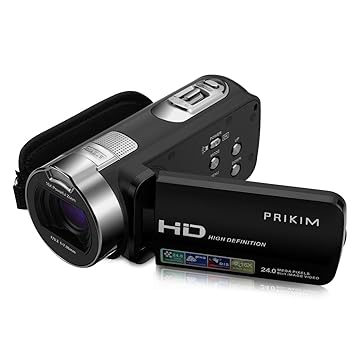
Video Camera: The video camera was most definitely the most important media technology we used throughout our whole time on the project. We were able to use a video camera provided by the school which was easily chargeable and was the perfect size for being practical for the sorts of facilities we have and scenes that we wanted to film. We got to use the camera for a large length of time which was perfect as in our trailer we needed to take many shots as that is what trailers tend to be full of. We also were given a tripod along with the camera which was perfect for when we wanted to create stable and smooth professional like shots. The device was not foreign to us as we had actually used the exact same one for our AS media project so there was no learning needing to be done in order to successfully use the camera, and its layout is simple enough to be understood quickly if there was any issues that arose. The camera also had a lead which we could plug into the computer and get our footage straight away without any hassle.
Adobe Photoshop: The photoshop application was crucial for my group to be able to create the title for the film and we all had a technical input on how we wanted the title to look. I had only had a slight prior knowledge on how to use the software before using it for our work, however whenever i found myself completely stuck i relied on youtube tutorials or help from experts in order to create the content i wanted. I used the software heavily when creating my movie poster and magazine front cover which i am new extremely proud of and happy with. The software included the font 'Franklin Gothic Heavy' that i needed to create the synergy i aimed for between all of my pieces, and it did not forbid me from transferring images from my other components of work on to it so i was able to make clear ties between my products. I also was able to find many other fonts that were perfect for me to create a professional looking movie poster as i decided to include a credit scroll at the bottom of the poster. The application offered a tool in which i could place the letters closer together which i believe gave my credit scroll the look that it needed to be authentic and believable. Blending tools were also offered on the software which meant i was able to perfectly mould my desired poster and take the inspiration from the 'Nocturnal Animals' poster which is what i aimed for. Lastly, photoshop let me convert my product into a JPEG which meant i was easily able to upload it to the internet and share my creation on blogger. Every computer or laptop had this software installed so it was easily accessible wherever you were to complete any work on photoshop.


iPhone: My iPhone was a huge help and a great media technology that i relied on throughout the experience of this course. It was one of the biggest forms of connection between my group besides being together in person. It helped us to plan when and where we were going to meet and was perfect for setting reminders on the facebook messenger app. Also many of the photos i have taken to document myself was through my iPhone camera and with the use of iCloud the photos i took came straight to my laptop which was perfect for posting onto my blog or our instagram page which we created dedicated to our film. I accessed social media through my phone nearly every single time and we used social media in order to garner comments about our film and to talk to each other directly. We used social media many times in the process including watching youtube videos on our phones to gain inspiration whether it be by watching other thriller trailers or tutorials on how to accurately do something if we ever became stuck in the editing process. We even took photos on our phone, printed them out and used them for the murder mystery board we used in the trailer.

Adobe Premier Pro: The editing software was something that me and my group had experience with in the past as we used it when creating our AS teen angst opening sequence. In our project from last year we had a tutorial and the information we gathered stayed with us - especially that of rewinding and fast-forwarding scenes which was included in both our AS and A2 projects. Whenever editing became an issue in the process, youtube tutorials on our phones became an ideal way of learning something that we didn't know how to do. Thriller trailer conventions were easily mimicked when using the software as it had a large variety of tools to lower the lighting, add text or images, add dramatic music and voiceover and a bounty of useful transitions - which we put to use and included throughout our editing. A downside to this software was that we had to use the same computer in the school every time we wanted to edit so if the computer was not free then you had to wait.

good discussion of how your iphone was used in production process and planning stages Niall.
ReplyDelete